Sunday, June 12, 2011

Blog Buddy...How To Add A Button To Your Blog


Welcome to another edition of Blog Buddy...the place to find helpful tips and tricks for your blog. I am not an expert, by any means, but I have learned a lot along the way (especially by making mistakes!)

I've had soooo many emails asking how to add a button to a blog. So today I thought I would show you how to "Grab a Button" from another blog to add to your side bar or to a post. You know I love pictures and they are worth a thousand words, so here are 17 pictures to show you a quick and easy process.

First, find the button you'd like to have on your blog. Some will have "the code" underneath and some will not. Let's start with the code.

Click any picture below to enlarge...

These 2 buttons on my blog, that are circled in the picture, have the code.


Place your cursor at the beginning of the code...left click and drag the high light feature down to the end until the whole code is high lighted.

Right click on the high lighted part and click on COPY.
 

Now go to your dashboard and click on DESIGN.


Click ADD A GADGET...


Scroll down until you come to the choice that says...HTML/JAVASCRIPT. Click on that.


A second window will pop up.

  • The TITLE section is what you want to say above the button...anything you'd like, the blog name etc
  • place your cursor in the top left corner of the big empty box and right click in there and pick PASTE.
  • that code you copied before should appear. If the word PASTE isn't there, just go back and copy the code again and come back to this box and try again.
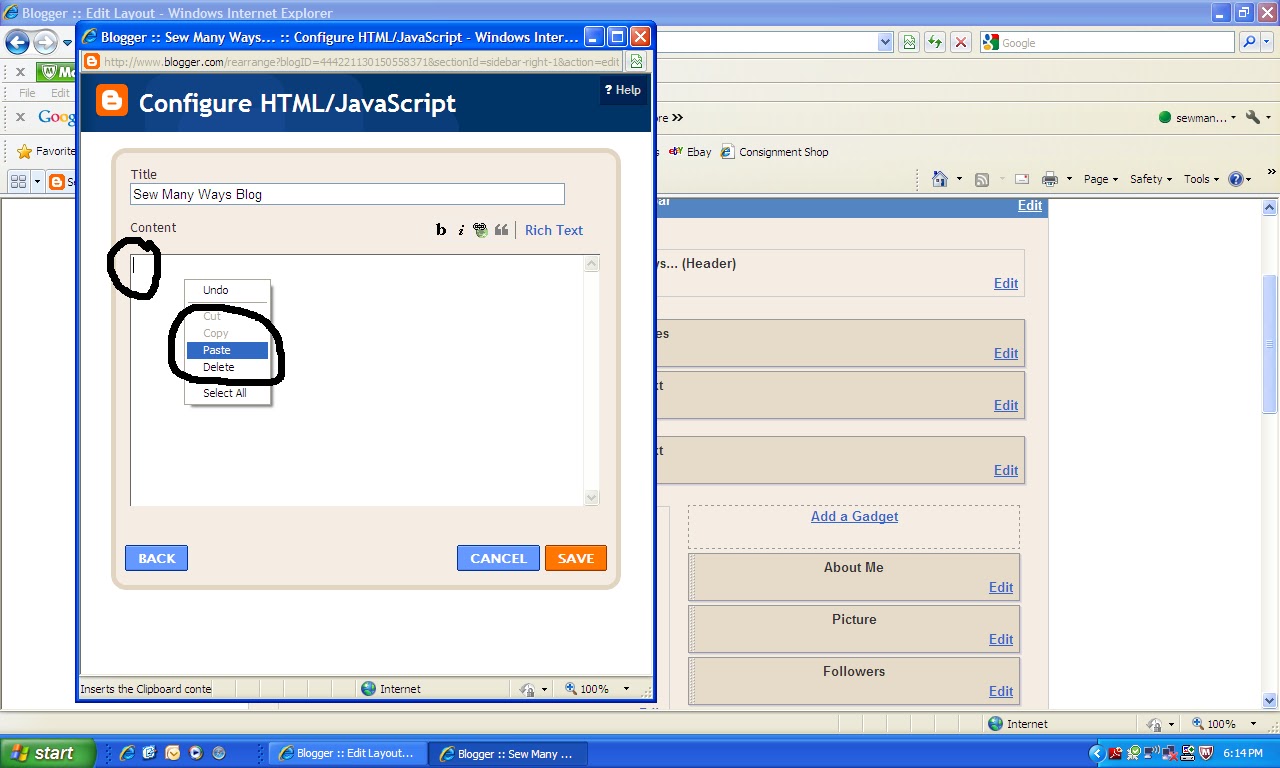

The code will be there, but make sure you click SAVE.


Now any gadget that you add to your blog will appear at the top of your side bar.


To move any gadget, just click on it and DRAG it to where you want.
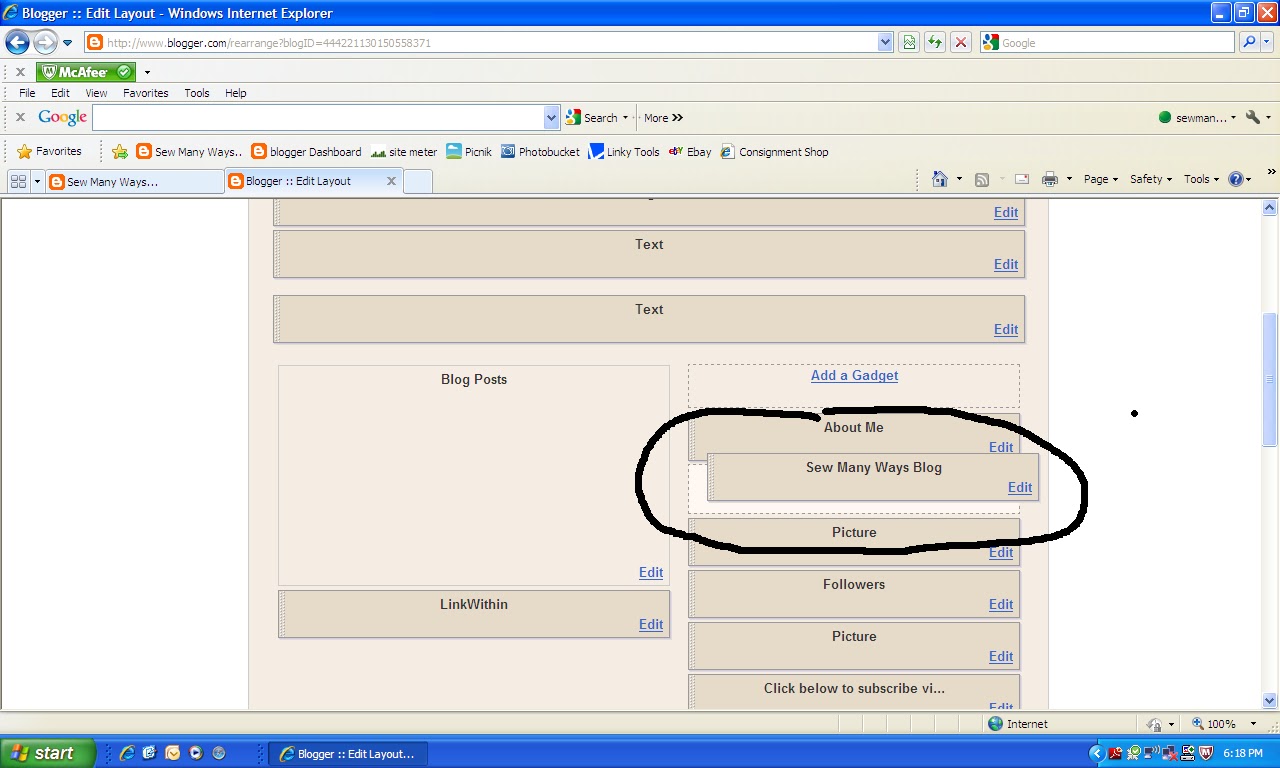

Make sure you click SAVE again after you have moved it into position.

Now you are all set!! A button that has a link back to that blog is now on your side bar. The code is the link back to that blog.


To add a coded button to your written post, just click on the HTML tab above the box you write a post in. You can do it before or after you start writing a post.

Just place the cursor where you want the button to be in the post and right click and PASTE that copied code.

To remove a button from the post, you can just click on it back in the COMPOSE tab and click REMOVE.


Now here is how to add a button if there isn't a code...

  • Right click on the button you want
  • click on "SAVE PICTURE AS" or what ever your computer says to save
  • save it and remember where it is


Now go to the design section and the add a gadget button. Scroll down to PICTURE.


In this window...
  • the TITLE is what is above the button or picture...like the blog name
  • the CAPTION is what's below...like "great place to find recipes"
  • the LINK is the address of the blog the button is from...just copy and paste it in there, but don't have 2 https in there if you copied it. The link address must be in there or the button won't work when you click on it. It will just be a static picture.
  • now BROWSE from your computer to go get the picture you saved earlier. Wait for the picture to pop up in that box before you click save
  • then click SAVE

Do the same thing to position it where you want. Click...


and drag into place. Don't forget to click SAVE...are you tired of me saying click SAVE !!


You can use that last "Picture" gadget to add any picture...not just a button picture. You can take a picture of one of your favorite posts from your blog and put a link to THAT post with that picture.

Hope you find this one helpful...

Happy Blogging,
~Karen~

Sew Darn Crafty Party...Week 18

It's Sew Darn Crafty Sunday...Sew, for anything sewing...Darn, for anything knitting and Crafty, well, that's just every thing else we do in life. I think we all have to be crafty these days to turn "ok" things into GREAT things. SDC is the start of a week long linking party to share the most wonderful projects, ideas, tips, vacations, dinner/desserts recipes etc.

This week, my project is to get my oldest daughter's room pulled apart to switch out a twin bed to a queen bed and paint the room too. However, a ton of college stuff still packed in boxes and an explosion of clothes is keeping me from it. I'm doing the prep work in the basement...painting the queen bed frame, getting other furniture ready and trying to move things out. This is my SDC project this week...we'll see how far I get and then I'll share it with you.

So let's see what you were up to last week...and don't forget to take pictures of projects you do this week, so you can link up next Sunday too!


Sew Darn Crafty is all about YOU!! Show off your projects, share a tutorial, show us your vacation pictures, share a family favorite recipe...share anything. Not only does linking inspire us all, it also brings lots of new people to your blog for a visit. Click here for past parties and lots of inspiration

Easy steps to join in on the fun...

  • link up to the specific project post, not your whole blog. Makes it easier to link right to that post and not  search through all your whole blog. To find the http address to a specific post, just click on the Title of your post.
  • link as many projects as you'd like...old or new
  • anything goes...cooking, sewing, knitting, crafts, organizing, remodeling projects etc...
  • visit other links to share some blogging love! You know we all love comments!
  • grab a Sew Darn Crafty button for your blog (on my right side bar) or just link to the party in your post.
  • the more we share, the more people will join and then there's more inspiration to look at!
  • linking is open til Saturday night, so plenty of time to join in
  • just click the "click here to enter" button and follow the easy steps

Have fun linking up! Don't forget to come back and take a look at all the great projects during the week,
~Karen~

Thursday, June 9, 2011

Thoughts on Thursdays...

Toilet paper on the dispenser...is the paper over from the top or from under? Mine has to be over! Has to be.

You???

You know "Thoughts on Thursday" can be about any thing...crazy or not!

Have a great Thursday,
~Karen~

Wednesday, June 8, 2011

Come Take a Peek For a Wonderful Cause...

Hello all my blogging friends! Thought I would share a wonderful project that Carlee is hosting over at her blog...Ladybird Ln. 

Starting next week on June 15th through the 22nd, Carlee is hosting a pillow contest for a wonderful cause. Carlee has a great friend, Malynn, who is 14 years old and has gone through some very tough medical problems. Even though Malynn has had problems of her own, she is still thinking of others. Malynn has a goal to donate 100 pillowcases to the Primary Children's Hospital. Amazing!

Here's where Carlee's Pillow Fight For a Cause comes in. From June 15th - 22nd, you can link up your best pillow project that you have done in the past to the linking party. All who link up a pillow project will be entered to win some fabulous prizes.

However, to enter the Pillow Linking Party for the chance to win the prizes that week, you MUST donate a pillowcase to charity.  They have a great tutorial on her blog so you can make a bright and cheery pillowcase to send. The pillowcase can be donated to your local children's hospital or charity or you can send it to Carlee to help Malynn's goal.

This is only a small desciption of the fun over at Ladybird Ln, so pop over there to read ALL the details

Click here or any red link on this post to read all about.

Thanks in advance for helping Carlee and Malynn to reach their goal and to have a successful Pillow Party!!

~Karen~ 


Ladybird Ln


Monday, June 6, 2011

Tool Time Tuesday...Recycling Candle Jar Tops

It's Tuesday and that means Tool Time, but today's post is also a recycling project. Jar candles are pretty pricey, so why not use every part of the candle and the jar. See the end of the post for links to other posts I've done on recycling candle jars.

Here is a large jar with the top on and some extra tops I've started to save.


This post is about using the tops for so many different things.


First, we need to take off that plastic ring that keeps the lid on the jar...here's where the "tool" comes into play. Had to find a tool time in this!


Carefully place the tip of a flat head screw driver under the rim of the plastic ring.


Slowly work the screw driver down until the ring pops off. Be careful not to chip the glass. That's it...nice and easy.


Now here you have it...the cutest little glass bowl, perfect for just about any thing.


Here are a few ideas!

How about a little bowl for sewing pins.


Great by your machine or by your side when doing some hand sewing.


Perfect as a collection on your desk.


Each jar top holds all your office supplies.


Painting project? Use a candle jar top as a re-usable dipping dish.


You can take this next idea with a grain of salt...had to do that pun. These will be great salt cellars and pepper too. I am assuming glass is glass and these are safe for food after you have washed them carefully...not sure, but just wanted to share the idea.


You could also use it to hold sugar packets.


How about the obvious...a tea light candle holder!


These would be pretty at each place setting at the dinner table, along the walk way, on your deck or porch etc


Now what to do with all the plastic rings I'm collecting...I'm thinking a ring toss game for the kids! Ahh, a future Tool Time in the making!


If you have any more ideas for these jar tops, share it in the comment section. I'd love to hear more.

Click here for the post I did on recycling the wax from the end of a candle.

Click here for the post on recycling the whole candle jar.

Happy Tuesday,
~Karen~

WANTED...Red and White Fabric Swappers

Thanks for all your help...I'm all set for swappers now! Wow, that was fast. If I have any more slots opening up in the next week...I'll do a shout out up again. THANKS


I have a few extra spots for my Red and White, 5 inch square fabric swap...

Qualifications for this last minute job offer job (lol):
  • must live in the US, due to mailing issues
  • must love red and white fabric
  • must like to cut 125 -  5 inch squares fast! Due date is June 15th
  • leave comment on this post
  • must have email address in the comment
  • first come first serve in the comment section...if you have an email address.
Here are the links to the detail post and all the other post for the swap, including postage and cutting.

Click here for main swap details

Click here for mailing post.

Click here for all posts for the swap.

I will email you to let you know if you are in!

Take care,
~Karen~

Sunday, June 5, 2011

Sew Darn Crafty Party...Week 17


It's a beautiful Sunday morning. It's been a crazy week here at Sew Many Ways, but I'm hoping to get some projects done today...I hope!! You know how that goes...the best laid plans. Maybe I shouldn't make lists. It seems I really never get all the things checked off. Too many projects floating through my head, that's why.

Speaking of projects...what have all of you been up to? I just love looking through the links you post each week. Amazing all the talent out there in this world! Inspiration every where. So let's get the party started!!

Sew Darn Crafty is all about YOU!! Show off your projects, share a tutorial, show us your vacation pictures, share a family favorite recipe...share anything. Not only does linking inspire us all, it also brings lots of new people to your blog for a visit. Click here for past parties and lots of inspiration

Easy steps to join in on the fun...

  • link up to the specific project post, not your whole blog. Makes it easier to link right to that post and not  search through all your whole blog. To find the http address to a specific post, just click on the Title of your post.
  • link as many projects as you'd like...old or new
  • anything goes...cooking, sewing, knitting, crafts, organizing, remodeling projects etc...
  • visit other links to share some blogging love! You know we all love comments!
  • grab a Sew Darn Crafty button for your blog (on my right side bar) or just link to the party in your post.
  • the more we share, the more people will join and then there's more inspiration to look at!
  • linking is open til Saturday night, so plenty of time to join in
  • just click the "click here to enter" button and follow the easy steps

Have fun linking up! Don't forget to come back and take a look at all the great projects during the week,
~Karen~

Wisata Danau Toba - Sumatera Utara

Danau Toba adalah salah satu destinasi wisata alam terbesar di Indonesia dan terletak di Sumatera Utara. Ini adalah danau vulkanik terbesar ...